Showing posts with label Digital Love. Show all posts

Friday, March 4, 2011

It’s Great to Be EIGHT Layouts – Digital Scapping!

(I haven’t forgotten to come back and post the rest of the CU pics and fun, but I’ve gotten a little distracted the past couple of days. I’m working on them and I will be back with more!)

This morning my friend, Suzi, came over for a visit and to work on some projects for the kids in Primary (church young children’s group).  She needed some layouts/templates for the kids who will be turning eight and getting baptized this year.   We had a lot of fun going through some of my digital supplies this morning while I threw these layouts together.  I think I really need to get my digi schtuff moved over to the ehd and organized here asap!

Here’s what we came up with.  These layouts can be printed straight up and have a pic adhered to them or they can be used as a “quick page” in PSE and have a digital photo inserted in the layout. These pages will be used as a cover for a little book that Suzi is making for each child for their baptism day.  The layouts are a standard 8.5” x 11”.

I did one layout for the boys.  I used papers and elements from “His Playroom” by Tracy Reid from Sweet Shoppe Designs.  The font is Rockwell.  Not sure who designed the stitching…

Great8BoyLOFLATweb

For the girls we did two layouts… but not intentionally. LOL!  We got the first pink one done and noticed that the paper did not extend all the way into the frame on the right side, and then we decided to try a different paper just in case some of the girls weren’t “froo froo” pink girls.   I love them both, but I really like the yellow paper layout! I think it’s a little more versatile.  The papers and some of the elements came from the Shabby Miss Jen “Sweetie Pie” kit.  The stitching, lace trim, photo frame, and tab came from miscellaneous other kits that I separated before I tagged, so I have no clue who they came from.  The font is BrodyD.

Great8GirlLOPinkFLATWeb

Great8GirlLO-YellowFLATweb

Thanks for popping in!

Inky Smiles!

Saturday, February 12, 2011

Digital Art: More Charming Images

Busy in the studio on the computer still… I’ve been LOVING playing with digital images and and creating fun little doo-dahs.  I’m in charge of the Charm Swap at Creative University and have been having so much fun with my charms.  I can’t show you my charms just yet but I wanted to share with you the image I am using on one of them (the Victorian Vintage Charm Swap)… 

KeepCalmCraftOnCharmImgWeb

This image is MUCH bigger than what the charm image is.  Think very small… under the size of a quarter…   Don’t worry, you can still see all the fabulous detail in the finished project. Something like this:

KeepCalmCraftOnCharmImgWeb

I created the image in Photoshop Elements using images from Itkupilli’s free test sheet. I created the word art using rectangles that I colored, aged, and snipped.  The text is made up of individual letters from the Portable Remington font that I manipulated individually (same as the charm cards I shared previously). 

The finished product is glittery and sparkly. I can’t wait to share!

I also made some new charm cards in a blue tone. I was trying to use the CU “colors” for the last set of charm cards… I like these better but the first set of charms was already packaged so they’re staying on red cards. LOL.. .the Under the Sea charm swap will get these blue toned cards.

CharmCard2011-BluesLayersWE

Sunday, February 14, 2010

Follow Up to Bling, Jiggle, Bling, Bling: More Bling

I know I said I would show you more Bling a long time ago. I’m just now getting around to it. I’ve been working on things around my house (hello life), SSD projects, my CU roomie gifts and packaging up the charms I showed you previously and getting things ready to go to Creative University in a couple of weeks. OH I also made a fun PAPER scrapbook layout that I can’t show you until after CU as well. I’m entering one of the art contests with it… can’t share just yet. tee hee. I know, I’m awful!

I can’t show u the roomie gifts yet, but I will schedule a post for while I am gone so that the roomies don’t see them ahead of time. :)

In the meantime, here’s a little of what I’ve been working on:

CUCharmSwapPackagingweb

These charms were SUPER fun to make and I needed a cute way to “present them” cuz you know, it’s all about the packaging, right? haha! Anyway… I didn’t want to spend hours and hours cutting and glueing so I created these little cards in PSE 7, printed them out on super heavy weight card stock (base weight from Gina K Designs). I poked holes with my paper piercer and strung some 24 gauge wire thru the holes to attach the charms. Worked like a charm, pardon the pun. I think I need to work on my printer colors/calibration or something because that ribbon is supposed to be a rich chocolately brown, not almost black.

Well now that we’ve got some charms we’re gonna need something to attach them to…. At least, that’s what I thought as I created some for myself. I didn’t have a “blank” charm bracelet so I figured I’d make one for myself.

Here’s what I came up with:

IMG_6661web

IMG_6645web

IMG_6659web

These bracelets are full of all sorts of silver colored (not sterling silver) jingle bling jingley bits and baubles. I’ve sold several to some CU attendees and will be offering them in my Etsy shop once I decide on a name and finish setting it up.

The bracelets are made in 7”, 7.5”, and 8” lengths and they can be custom fit as well. Each bracelet has at least 7 clear Swarovsky crystals (2 different types) on it. They are finished off with a giant decorative toggle attached to the bracelet with 2 jump rings for security and a dangling charm that coordinates with the bling on the bracelet. They can be worn alone or with charms attached. No two are exactly alike. :)

I have two that I wear a lot. One has charms on it and one is simple , as it is.

Hope you’re having a bling, jingle, bling, bling day!

~Inky Smiles

Tuesday, October 6, 2009

Getting Back In The Saddle / Swing of Things / Craft Room Again

Hey friends!

Just a quick note to let you know that I have not died or dropped off the planet. We just got back this morning (3:30 am) from a fabulous 11 day east coast vacation to see the foliage changing in upper New Hampshire, Vermont, playing in the Boston area, visiting my extended family in western Massachusetts and celebrating my grandfather’s 80th birthday. It was SO MUCH FUN and I am SO STINKING tired. COMPLETELY filled a 2 gig camera card and started on a 1 gig… Gotta make some time to organize and edit photos this week! :)

I did get to meet a really neat lady on the plane. She was sitting behind me talking to a darling little old lady who was seated next to her… I was trying to get comfortable with a pinched nerve in my hip (and teeeeeny tiny seat) and caught the word “scrapbooking” and “work from home”in their conversation and after a little while I couldn’t stand wondering what company she was talking about, so I was nosey and turned around to talk to her. lol! Turns out she’s is Brandy Murry from ScrapGirls.com!! How awesome is that! She was on her way to the Scrap Girls convention in Salt Lake City. I thought that was pretty neat and I am totally digging her products!

Also, I did make a plethora of cards and crafty things to take along on our trip. I will share them later this week.. in the meantime it’s back to work and all the fun cleaning up, unpacking, and laundry that comes when you return from a very long trip. Here's a little bitty I made for one of my aunts.

ArbuckleBook

Inky Smiles :)

Erin

Friday, July 11, 2008

Digital Delights.... shaZAAAM!!

Today, for her Photoshop Friday tip, Jessica Sprague showed us a WAY STINKING COOL filter/layer/enhancement technique to jazz up otherwise blah photos.

She calls it shaZAM ..... And boy does she mean it!

Here's my photo straight out of the camera {S.O.O.C.}:


I followed Jessica's super easy and clear instructions on her blog.

and...

shaZAAAAAAAAAAAAAAAAAAAAM!!!


I have a fabulously shaZAM'd photo.

Here are the before and after shots side by side....

What a difference a Screen layer and an Overlay layer make! And by golly ain't she the cutest dog you ever did see?

Happy shaZAM'ing!

Monday, June 23, 2008

Digital Organization & Enabler Alert

So while we are on the topic of organization, I thought I might share how I organize my digital stash (digital scrapbooking supplies AND digital photos AND digital layouts, etc).

Last year several girls in my Photoshop class recommended the program ACDSee to me for helping me organize my digital stash. At first I was a bit overwhelmed, but then I found some cool online sources for help and now I love using ACDSee to organize my loot. Basically you can tag each of your items with whatever attributes you would like to use for your version of sorting/organization. Once you're all tagged, you can select the attributes that you want from a list you create and ACDSee will pull up what you're looking for.

You can tag by designer, by kit name, by color, by texture, by pattern, by theme, whatever helps YOU keep track of what you've got. You can put as few or as many tags on an item that you want. Then, when you're ready to search, you can also select as many tags (attributes) as you want and start pulling up and viewing items. IT's AWESOME!!! I tag everything first and then sort out into their new "storage categories".

Here's a super quick & simplified breakdown of how I organize my digi scrapbooking supplies:

When I first download new kits and items, they (the zipped folders) go to a folder on my desk top called "Zipped Digi Scrap". I save the zipped files in here until I get a chance to unzip and sort them into their appropriate files.

** On the left side of the screen shots you see a list of files. These are the actual folders on my computer where the files are physically stored. This is where I would drag and drop to physically sort and organize the files.

** On the right side of the screen shots are the lists of categories of tags/labels. This is where you drag and drop for tagging purposes only.
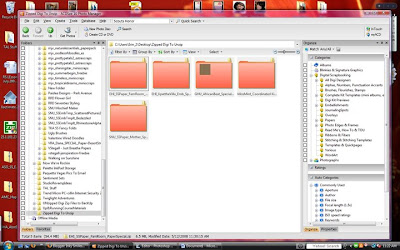

When I unzip the files, I save them in an "New Digi Scrap to Sort" folder. I know this might seem like overkill, but it works for me and I don't always have gobs of time to unzip and tag and finish sorting at the same time. Sometimes I "buy and fly"...
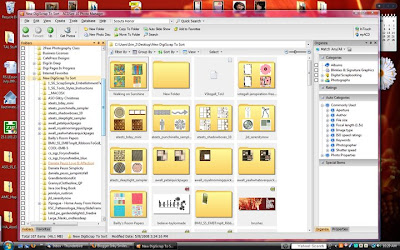

Anyway... When sorting them and tagging them, I open up ACDSee and begin the sort process. (Something I learned the hard way: If you don't sort & tag within the ACDSee program, your tagging system will not work. Always make changes IN the ACDSee program.) I first label the whole folder by Designer and then the Kit name and then go through each element of the kit and start tagging. Once you have set up your tags/labels, it's a relatively quick process.

Here's an example of where I have downloaded a Jessica Sprague kit and began sorting. The first thing I did was to create a folder under Designers>Jessica Sprague for the kit "Home Away From Home". Then I highlight everything in the kit and drag it over to the Home Away From Home tag under Jessica Sprague. This tagged EVERYTHING in that kit as Jessica Sprague - Home Away from Home Kit.
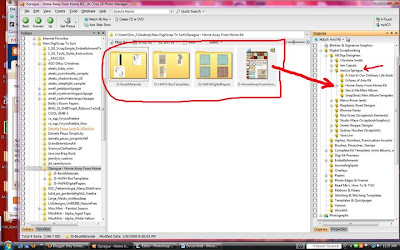
Now, after I have sorted things (not tagged, actual sorting) into their appropriate files I can go back into ACDSee and select the Jessica Sprague - Home Away from Home tag and it will pull up everything in that kit in the view window, and then I can drag and drop what I want to use into Photoshop.

After the main kit tagging, I go back and open up each and every item in the kit, papers, embellishments, word art, etc and tag them appropriately. In this example I have tagged a striped paper from the Home Away from Home Kit. When I select the paper file, I drag it to the "Stripes" tag under Patterned Paper, under Papers. The cool thing is that it applies all the tags "Papers, Patterned Papers, Stripes" to the file all at once, with one drag. YAY!
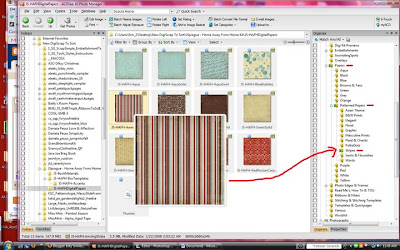
I do this for all the elements in the kit and then go and sort the items into my actual folders categories which reflect the same names as my tagging categories. This part is super fast because I can pull up all items tagged Paper, Staples, Brads, whatever and just drag and drop into their new folder home.

This is super simplified, but I hope it helps someone. You can get some great tutorials and more detailed help from a site called Digi Scrap Info. They have some amazing ACDSee tutorials. :) You can also read more info on it from Jessica Sprague by clicking here to go to the article on her blog.

Happy Organizing! We have a super busy week this week! A ton of InkStaks to build and ship out, a big church ladies event (Enrichment) in my backyard on Wed night (Dutch Oven cooking... mmm) and I have to start sorting things in the house so that we can get ready to start working on replacing flooring. I found some awesome hardwood flooring for an AMAZING price online! It should be here in about 10 days! WOO HOO!


So now that I have told you all about this,
here's some FABULOUS news!!

ENABLER ALERT - BIG SALE BIG SALE BIG SALE!!!
Receive 40% off ACDSee 10 Photo Manager!
Take advantage of the Summer Fun Sale! Offer Expires 08/26/08

Create captivating layouts with ACDSee
6/24/08 UPDATE:
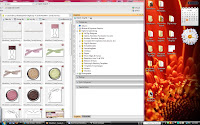
I've gotten several emails on what my "tag structure" looks like. The easiest way other than typing it all out is to give you the screen shots. Thank goodness for that function! I've also been asked what the difference between the PSE Organizer and ACDSee is. I can't really tell you other than I played with PSE Organizer for a couple of days and did not like it. I went back to using my Windows file system to sort and organize... and then I discovered ACDSee and loved it. One thing I didn't like was how PSE Organizer bogged down my computer when sorting and tagging, etc. I think you just have to compare the two for yourself.

Click photos to view larger & details
Thursday, June 12, 2008

Digi Fun... Independence Day Is On It's Way...

Since everything is still topsy-turvy around here I have been playing around in the digi realm... Every year since we've been in this house Brent and I have had a big neighborhood/friend 4th of July Pot luck BBQ & Fireworks party. Each year different people show up and each year seems to be more fun than the previous year. This year I had wanted to make some really cute paper invites, but things are obviously, well u know, so I did them digitally in PS Elements.


The papers used are from Christine Smith and the elements used are from Christine Smith , Raspberry Road Designs and some random ones that I picked up somewhere along the way and don't remember where they came from. I've omitted my address for any "party crashers".. lol!

Monday, April 21, 2008

Best of Pals

WOO HOO & BOO HOO! Lesson 4 (our final lesson) is complete!! YAY! I spent some time this morning working on the lesson and learning some new skills. We learned to create the word and letter stickers straight from plain typed text, made a trapezoid shape to create masks and cool designs, extracted people from a photo with a white/solid background and all sorts of other fun things.

I had a blast taking photos of Brent and Sadie yesterday afternoon. (I shot about 100 photos when all was said and done...) We hung an off white sheet over our fence and I had them playing and goofing off while I shot pics. It was a totally fun photo session.

Here's the layout:
{Click on photo for a better view}

Here is how you get your dog to perform for the camera:


And here are some of the fun outtakes:


Wednesday, April 16, 2008

Digi In Deep : Digital Layout - This Is Me

Heya friends!

I went out of town last week (I will share pics tomorrow) and haven't had a chance to play on the blog yet this week. I've got some fun {paper crafting} projects I am working on after I get work tackled today and will share with you as I finish them.

In the meantime, I have this fun layout I just completed for my Digi in Deep class with Jessica Sprague. It's called "This Is Me" and is LOADED with layers of digital fun! I actually had a BLAST with this lesson and can't wait to have a little time to work on practicing the skills from the lesson.

There was really no "primping" for this pic... Thank you Jessica! She instructed us to take our photo in the bathroom mirror and "don't worry about looking hot, you're going to be blurry anyway." (....or something to that effect.) I quickly pulled on a bright shirt and threw a headband on to tame the "morning mane" and probably shot 60 pics until I got one that would work. Took some really fun shots, too. I might have to scrap them later!

Some of the skills we learned were: making the scalloped circle frame, adding grungy text as a texture layer, making ghosted (acrylic) flower images, FAKING OUT aperture in Photoshop (the clear finger and blurry me), layering a colored photo over a b&w photo and picking up the color from under neath with a ZILLION layers, scanning your fingerprint, etc... WOWZA! So Fun!


The quote for the inspiration of the "caption tags" is:

"The grand essentials to happiness in this life are somethign to do, someone
to love, and something to hope for." ~Joseph Addison

{Click on photo to view larger}

Can you guess how many different layers are in this layout? Like I said, there are TONS of them. See if you can figure it out - err, I mean guess - and I will let you on Friday morning. (Jeanne T and others in the class... shhhhhhhh... please don't share, yet.)

Inky Smiles!
Erin

4/18/08 - UPDATE:
There are two documents in this layout - a photo document (the focal photo and the frames) and the main scrapbook layout page.

The layers are as follows: Photo document - 53 layers, Scrapbook layout page - 46 layers, Total layers = 99 layers!

Wednesday, April 2, 2008

Digi: In Deep First Lesson's Layout - Geocaching

Digi: In Deep from Jessica Sprague began on Monday and I am just now finishing Lesson 1. I had to work Monday and Tuesday (training our new secretary who's taking over part of my old job) and didn't have a lot of free time to play around. I can't wait to open Tuesday and today's emails from Jessica to see what neat tips, techniques, field trips, freebies, or challenges, they might contain. Every day we get a new email from Jess with cool stuff in it.

It only took me HOURS to do this layout, but it was so much fun! It took hours and hours because I would stop and pause my lesson as I followed along and learned all the various techniques or rewound to make sure I got it right when I didn't fully get something immediately. DID lessons are faster paced and packed with more information than my last couple of classes.

We cut apart flourishes for the title and added to the title, cut complex shapes and masks, "cut" without cutting, recolored objects (buttons), masked paper without loads of extra layers, created scallops, and so much more.

{Click On Photo To View Larger}


Geocaching (pronounced "geo cashing" ) is one of our new(er) hobbies... mostly Brent's, but I enjoy tagging along, too. If you want to learn more about Geocaching, visit www.geocaching.com to learn more. Be careful, it's an addicting, and could potentially become an expensive hobby.

The text in the "vellum" journaling block says:

"You wanted a GPS unit for ages. You did your research, saved your money, and finally purchased one. Sadie and I tagged along on your adventure and spent a fun spring afternoon walking in the woods and searching for a cache. It was fun to watch you crawling through the brush looking for the cache that was right under your nose."


Saturday, March 29, 2008

Digi Layout - Family at Yellowstone

I'm gearing up for my next scrapbooking with Photoshop class (Digi in Deep) with Jessica Sprague and went back and practiced a little from our previous class lessons & it's been shared on Jessica's class forums, but don't think that I have shared this layout yet on the blog. (If I did already, I apologize for re-sharing - loL!) This layout is from our Week 3 lesson in Now We're Rockin'. It was so much fun to make!!! We custom created and tweaked existing elements to create the fun elements used on this page and I learned how to blend photos into the background. We layered load s and loads of brushes on top of each other to create the fun effect aroudn the main photo and red brush frame.

These photos were taken at our favorite place in the world to spend time away from home, Yellowstone National Park. We went to Yellowstone with my parents in Sept 2006 for several fun days. I hadn't been there with my parents since I was 9 months old. My dad was our lucky charm that year because we saw TONS of bears, including a way cool grizzly bear crossing the Yellowstone River by Fishing Bridge. ( I need to find the photos to post them, so very cool!)


Tuesday, January 29, 2008

Garden Song

More digi scrapping... this is the layout we made in Lesson 2 of Jessica Sprague's Now We're Rocking with Photoshop class. It was soooo fun to make and I am sooo ready for SPRING!

Inky Smiles!

MMMM Summer Fun!

It is sooooo dang cold here still! It's snowing AGAIN tonight and "they say" it's just starting!!! We had snow yesterday and will have it AGAIN on Friday and possibly AGAIN on Sunday! WOW! This is FAB-U-LOUS for snow pack in the mountains and water supply for this year, but, MAN, I am tired of being COLD.

So..... I thought I'd scrapbook a couple of summer pages to try to warm up. I am still COLD, but I feel more cheerful about it!

This is a 2 page digi layout of my sweet baby, Sadie, and my two darling nieces, Megan and Jaylee. Sadie LOVES to chase the water from a hose. She will whine and howl when you're watering the lawn/flowers/garden until you completely DOUSE her with the hose. She is the funniest thing to watch... she attacks and chases the water. If it's just a trickle she will look at you with her sweet puppy eyes until you put it on full blast. It doesn't matter where she is in the yard... once she hears the water turn on she is on that hose!

{Click on photo for a larger view}

Most supplies are from the free {HUGE} digi kit from Sweet Shoppe Designs that I received in Jessica Sprague's Now We're Rockin' Photoshop class. The torn paper template is by K. Pertiet. The circle template is from Jessica Sprague.

The journaling reads, "Oh the joys of summer... Playing at Uncle Brent and Aunt Erin’s house with Saidie and the water hose. There’s nothing like a spray down and a soak and a roll in the soft green grass."

Sunday, October 21, 2007

Beautiful & mister toad


This layout was fun! I used a "quick page"/template and stuck a photo in and added some journaling and the date. I LOVE this photo of Brent. He's always so happy and good to me. I couldn't ask for better!


We found Mr Toad in our guest room window well in the summer of 2006. I guess he must have fallen in while hopping in the flower garden that surrounds the back side of the house. Brent scooped him up and we had fun playing with him for a little while before setting him free along the creek on the back of our property. He truly was a beautiful little creature.

Think Pink


I'm up waaaaay too late tonight! Fighting off heartburn (dang garlic chicken pitas) and figured I'd do a little "homework" for my Up & Running With Photoshop class.

Here's a goofy me in a layout inspired by the packaging for Victoria's Secret perfume Pink. LOTS of white space....totally out of my box.

Friday, October 19, 2007

Enabler Alert - ScrapGirls digital supplies SALE!

Enabler Alert!!

I just opened yesterday's newsletter from ScrapGirls. Oh my goodness! They are having a BIRTHDAY SALE! WOO HOO! Almost everything is 22.3% off their already super reasonable prices. If you click on the banner below, it will take you right to the store and I will get credit for anything you purchase... SaWEEET! Brent's going to probably cut up my debit card when I'm done shopping... Shhhhh!

Click here to start shopping: *edited* It works now... whoops!Scrap Girls: Making it simple for YOU to become a great digital scrapbooker!

Monday, October 15, 2007

Digital Scrapbooking - My first full digi layout!

Brent gave me "tuition" to a class this spring for my bday... Originally I had wanted to take a cake decorating class, but I just couldn't get myself to sign up for it. I kept "humming and hawing" about it and then Jeanne Tomshack told me about this FABULOUS Photoshop class she took from JessicaSprague.com and showed me photos of the layouts they made in the class. And you know, OF COURSE I had to sign up for the October class!!!! SOOOO... I took my "tuition" that Brent gave me and registered for the Up & Running with Photoshop class.

Here's the first digi layout that we made. Super simple, but very cool.